Welcome to Family First CU
Welcome, Focus First Members!
Our commitment to delivering the exceptional service, trusted guidance, and personalized support you’ve come to know and trust remains strong as we near the completion of this merger. We look forward to what’s ahead and are grateful to have you with us for this exciting journey!
Online Banking Information
Focus First’s Online and Mobile Banking are no longer available. If you haven’t already done so, be sure to register for Family First’s Online & Mobile Banking below!
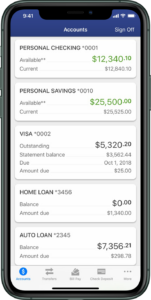
We have everything you need to do your banking, right at your fingertips. With Family First’s Online Banking and Mobile App, you can:
- Check account balances
- Pay bills online
- Transfer money
- Remote deposit checks
- Set up custom alerts and notifications
- Access eStatements & Tax Documents
- Plus so much more!
Frequently Asked Questions
Accounts & Routing Number
Has my account number changed?
Your account number may not have changed, but your routing number has. Make sure to update all electronic/automatic payments/direct deposits that were previously set up to your Focus First account with your correct Family First account number and the Family First Routing (ABA) Number.
What is Family First’s Routing (ABA) Number?
Family First’s Routing (ABA) Number is 222382593.
Family First Branches & ATMs
Where are Family First’s branches and ATMs located?
For our full list of Family First branches and ATMs, click here.
What is Shared Branching?
Shared Branching (Co-Op Credit Union Network) gives members of participating credit unions convenient access to 5,600+ branches and 30,000+ ATMs nationwide. Find a shared branching location or ATM near you with the Co-Op Shared Branch Locator.
Cards & ATMs
Will I receive a new debit card?
Yes, new Family First Debit Cards will be sent to replace your Focus First debit card. You will receive your new card by March 15, 2026. If you have not received a new card or would like to open a checking account, please contact Family First.
Please activate your new Family First Debit Card by following the activation instructions that come with your card. Be sure to destroy and properly dispose of your Focus First debit card.
Will I receive a new credit card?
Yes, new Family First Visa Credit Cards will be sent to replace your Focus First Credit Card. You will receive your new card prior to conversion on April 1. If you have not received a new card or would like to open a Family First Visa Credit Card, please contact Family First.
Please activate your new Family First Credit Card by following the activation instructions that come with your card. Be sure to destroy and properly dispose of your Focus First Credit Card.
When should I start using my new Family First card?
All members should now be using their new Family First debit and credit cards. If you have not yet received a new card, please reach out to a Family First representative right away. Focus First cards should be destroyed and properly disposed of.
Why haven’t I received my new debit/credit card?
If you have not yet received your new Family First debit or credit card, please contact a Family First representative right away.
How do I activate my new Family First card?
To activate your new Family First Debit Card or Visa Credit Card, follow the activation instructions provided with the new card. For assistance with card activation, please contact a Family First representative.
Will I have access to ATMs with my new debit card?
Yes, once your new Family First debit card has been activated, you can make unlimited transactions at Family First and Shared Branching ATMs with no fees.
Notice: If you use your Family First debit card at an ESL ATM, you will be charged an ESL ATM fee. Click here for the Family First Fee Schedule.
Checks
Will my Focus First checks still work?
No, Focus First checks will no longer work. To order new checks, please contact a Family First representative. We can also issue free starter checks at any of our locations.
If you are ordering checks through a third party, please use your 13-digit Family First account number and the Family First Routing (ABA) Number: 222382593.
Loans
Will my loan(s) remain the same?
All Focus First loans bave been transferred to Family First with the same terms. All members with loans should have received communication from the Family First lending department.
How can I make a payment?
Starting with your April payment, all payments should be mailed to: 2520 Browncroft Blvd. Rochester, NY 14625
Payments can also be made 24/7 with Family First Online & Mobile Banking.
To set up automatic payments or discuss alternative payment methods, please contact Family First.
Online & Mobile Banking
How do I register for Family First Online & Mobile Banking?
Registering for online banking is easy! Click here to complete the simple electronic registration form and set up your new profile.
How do I enroll in eStatements?
Enroll in eStatements within Family First Online & Mobile Banking to access your account statements and tax docs, anytime and anywhere! Follow the easy enrollment steps below.
Online Banking: Navigate to the “Member Services” tab within your profile and click on “eStatements & Tax Docs.” Follow the simple steps to complete enrollment.
Mobile App: Navigate to the “More” tab, then under “Documents & Forms,” select “eStatements & Tax Docs.” Follow the simple steps to complete enrollment.
Combining the strengths of these credit unions means greater convenience and expanded offerings for our members, while continuing to deliver the high level of service they deserve. We are thrilled to welcome the loyal members and talented team from Focus First and look forward to building a stronger future together.
Thomas Dambra, Family First CEO